NCH Software Home
Home | Download | Support | Products | SiteMap

How Do I Change CallURL Settings?

  1. Close DialDictate and all other applications which are using the CallURL device
  2. Open the CallURL Line Detector (Start->All Programs->CallURL->Voice Link Easy TAPI->Tools->DIAG32)
  3. In the Current Channel drop down box, select one of the Channels available
  4. From the menu bar, select Settings->More Options
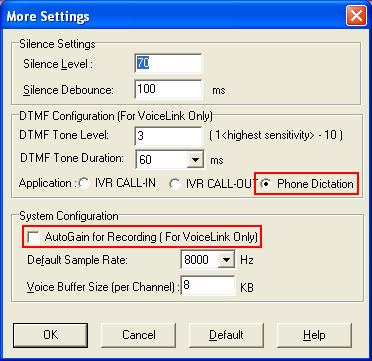
  5. For the Application type, select the "Phone Dictation" radio button
  6. Uncheck the "AutoGain for Recording" setting
  7. Click OK and close the Line Detector application
  8. Restart DialDictate


Try Dial Dictate
If you are in doubt about whether Dial Dictate will do what you want we recommend you try the free download. Seeing the program in front of you often answers most questions

Get It Now

Top Product Categories

Sound Recording Software
Audio Software
Dictation Software
Video Software

Most Popular Programs

WavePad Audio Editor
Switch Audio File Converter
Express Burn CD/DVD Burner
Prism Video File Converter
RecordPad Sound Recorder

Top | Back to Dial Dictate | Privacy | Legal | Home
© NCH Software