Kostenlose VST-Effekte Empfohlene kostenlose VST-Plug-ins für WavePad Im WavePad Audio-Editor ist die Unterstützung für VST-Plug-ins integriert, welche Ihnen Zugriff auf Tausende zusätzlicher Tools und Effekte geben. Unten stehend finden Sie eine Liste mit empfohlenen kostenlosen VST-Plug-ins, die Sie herunterladen und in WavePad verwenden können, um Ihre Audioprojekte weiter zu verbessern. Für weitere Informationen zur Verwendung dieser VST-Effekte sehen Sie:
Wie man VST-Effekte herunterlädt und in WavePad verwendet. |  |
Hall- und Echo-Effekte Name: Ambience
Typ: Hall-Effekt
Download-URL: http://magnus.smartelectronix.com/#Ambience ODER http://www.smartelectronix.com/~magnus/files/ambience-demo-win-vst-2003-10-25.zip
Unternehmen: Smart Electronix
Beschreibung: Ambience ist ein Reverb, dessen Qualität den besten kommerziellen Reverbs in nichts nachsteht. Sie können selbst entscheiden, wie viel und wann Sie dafür bezahlen möchten.
Name: Valhalla Super Massive
Type: Reverb Effekt
Download URL: https://valhalladsp.com/shop/reverb/valhalla-supermassive/
Unternehmen: Valhalla
Beschreibung: ValhallaSupermassive wurde von Grund auf für MASSIVE Delays und Reverbs entwickelt. Machen Sie sich bereit für üppige Hallwolken, übernatürliche Verzögerungen und anschwellende Feedbackwellen, wie Sie sie noch nie zuvor gehört haben.
Name: OldSkoolVerb
Typ: Reverb Effekt
Download-URL: http://www.voxengo.com/product/oldskoolverb
Unternehmen: Voxengo
Beschreibung: Dies ist ein VST-Plugin für eine Halleinheit, das sich hauptsächlich für Instrumente und Sounds eignet, die keine scharfen perkussiven Elemente enthalten, da dieser Hall sonst zu nervös klingt. Dieser Hall eignet sich hervorragend zur Schaffung zusätzlicher Atmosphäre.
Name: Spread Delay
Typ: Echo/Delay Effekt
Download URL: https://audec-music.com/spread-delay
Unternehmen: Audec
Beschreibung: Multi-Tap-Delay-Effekt im Ping-Pong-Stil.
Komprimierung Name: Rough Rider
Typ: Compression Effect
Download-URL: http://www.audiodamage.com/downloads/product.php?pid=ADF002
Unternehmen: Audio Damage.
Beschreibung: Rough Rider ist ein moderner Kompressor mit etwas Vintage-Biss und einem einzigartig warmen Klang. Perfekt zum Hinzufügen von Kompressionseffekten zu Ihrem Drum-Bass. Es klingt auch großartig mit Synth-Bass, klarer Gitarre und Hintergrundgesang. Rough Rider ist definitiv kein Allzweck-Kompressor, sondern eignet sich am besten, wenn er rhythmischen Tracks mehr Schwung verleiht. Natürlich können Sie es verwenden, wie Sie möchten. Die Kompressorpolizei kommt nicht zu Ihnen nach Hause und gibt Ihnen eine Vorladung. Legen Sie es über einen Track und drehen Sie einige Knöpfe.
Mastering- und Gate-Effekte Name: Blue Cat's Triple EQ:
Typ: Equalizer Effekt
Download-URL: http://www.bluecataudio.com/Products/Product_TripleEQ
Unternehmen: Blue Cat
Beschreibung:Der Triple EQ von Blue Cat ist ein semiparametrischer 3-Band-Equalizer, der als einzelner Filter mit anpassbarer Form gesteuert werden kann. Es umfasst einen Low-Shelf-Filter, einen High-Shelf-Filter und einen Boost/Cut-Peak-Filter. Sein großer Verstärkungsbereich (+/-40 dB pro Band) und Bandbreite (0,01 bis 5 Oktaven) macht ihn sehr vielseitig für die Erstellung jeder Filterform. Die drei Filter sind miteinander verknüpft, sodass sich die Parameter der drei Filter entsprechend ändern, wenn Sie die Mittenfrequenz oder die Bandbreite ändern: Sie können die gesamten Equalizer-Eigenschaften mit einem einzigen Mausklick steuern.
Weitere VST-Effekte Name: iZotope Vinyl
Typ: Vinyl Effekt
Download-URL: http://www.izotope.com/products/audio/vinyl
Unternehmen: iZotope
Beschreibung: Als ultimative Lo-Fi-Waffe nutzt iZotope Vinyl 64-Bit-Verarbeitung und fortschrittliche Filterung, Modellierung und Resampling, um eine authentische „Vinyl“-Simulation zu erstellen, als wäre der Ton eine Schallplatte, die auf einem Plattenspieler abgespielt wird.
Name: KarmaFX Plugin Pack
Typ: Reverb, Filter, Delay
Download-URL: http://karmafx.net
Unternehmen: KarmaFX
Beschreibung: Das KarmaFX Plugin Pack ist eine Sammlung hochwertiger Effekt-Plugins, die klein, einfach und benutzerfreundlich sind. Plugins, die einfach ihre Arbeit erledigen, ohne zu viel an den Knöpfen drehen zu müssen.
Wie man VST-Effekte herunterlädt und im WavePad Sound-Editor verwendet: - Laden Sie einen der kostenlosen VST-Effekte von der obigen Liste herunter. Wenn Sie diesen Effekt installieren, müssen Sie auf Ihrem Computer einen Speicherort bestimmen. Normalerweise ist es eine gute Idee, einen Ordner namens „VST“ zu erstellen, um dort all Ihre VST-Effekte zu speichern.
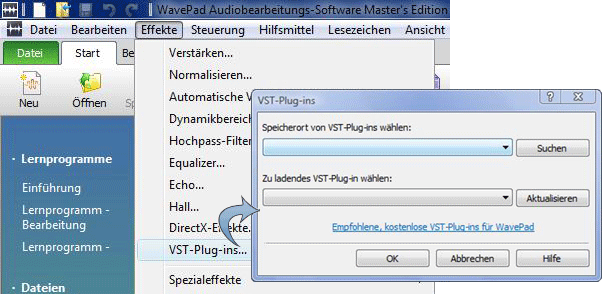
- Sobald Sie Ihr VST-Plug-in heruntergeladen und in den gewünschten VST-Ordner gespeichert haben, können Sie WavePad öffnen und im oberen Effektmenü „VST-Plug-ins“ auswählen.
- Dadurch wird das Fenster VST-Plug-in geöffnet. Im ersten Feld sehen Sie den Speicherort vom heruntergeladenen VST-Effekt. Sie können zu diesem Speicherort navigieren, indem Sie die Suchen-Schaltfläche anklicken oder einfach direkt den Pfad eingeben. Dadurch wird das VST in die Liste „VST-Plug-ins“ geladen.
- Verwenden Sie das Drop-down-Menü mit den VST-Plug-ins, um Ihr VST-Plug-in auszuwählen und klicken Sie OK.
- Ihr VST-Plug-in wird in WavePad geladen. Sie können Ihre Wellenform weiter bearbeiten und all das tun, was Sie normalerweise in WavePad tun, außer dass alles was Sie nun hören, vom neuen VST-Effekt verarbeitet wird. Um den Effekt zu speichern, müssen Sie die Schaltfläche „Anwenden“ im Effekt drücken. Dies schließt den Effekt und speichert das Audio mit dem neu hinzugefügten Effekt.
|

 Beginnen Sie noch heute mit der Verwendung von VST-Effekten in Ihren Audioprojekten