|
|
Fast, Easy-to-Use and Powerful Disc Burning Software 1 Fast Disc BurnerFastest CD/DVD writing program in the world 2 Easy-to-Use & PowerfulDrag the files directly into the application, then the software does the rest 3 Burn Data DiscsIdeal for backup needs and all media burning 4 Advanced FeaturesCommand line operation for automation and integration with other programs |
Express Burn Has Everything You Need to Burn Your Discs | |
 | Audio CD RecordingListen to CDs in the car or offline
|
Video DVD and Blu-Ray BurningTo play on a DVD or Blu-ray player
|  |
 | Custom DVD AuthoringCreate Menus Fast & Easy
|
Data CD, DVD or Blu-Ray WritingPerfect for creating backup discs
|  |
 | Advanced Disc Burning FeaturesAutomate and integrate
|
Listen to music CDs while you driveAudio on the goWhether you are commuting to work, taking a road trip, or running errands, listening to a great soundtrack makes the drive better. Burn your favorite songs to a CD to play in your car. With Express Burn, you can make a great mix to keep you going. |  |
 | Save cherished memories to CD and DVDEasily share & archiveMaking sure your most beloved photos and home movies are protected is made easy by burning them to disc. Just drag & drop images and video files into Express Burn and keep your memories safe Easily create discs to share with the whole family full of good times, special places, and fond memories. |
Download Express Burn CD Burning SoftwareSystem Requirements
| * Subject to copyright. NCH Software products cannot be used to break copy-protected or region-protected videos. Audio and video functionality is for use with your own content only. Express Burn comes with a simple and intuitive interface that provides quick and easy access to all the tools and features you might need to create your disc. - Review from Softpedia. |
Powerful Burning SoftwareBurn to CD, DVD or Blu-ray quickly and easily with Express Burn. 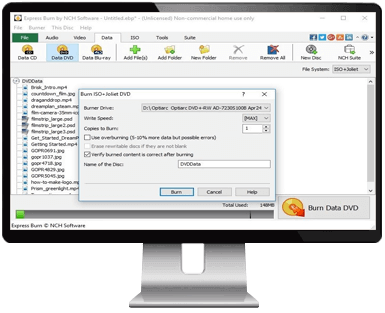 |
 Get Started Burning CD, DVD or Blu-Ray Discs Today