NCH Swift Sound Home
Home | Download | Purchase | Support | Products | SiteMap  

Office Intercom Audio Communication Software

Speak to others over the internet or your local office computer network

OfficeIntercom lets you use your computer to speak to others over the internet or your local office computer network.

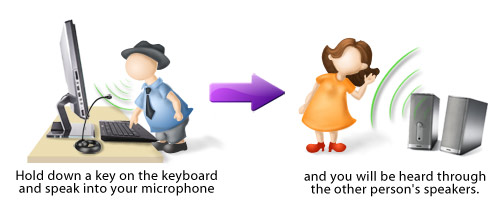
It works as a virtual intercom and feels a little like using a CB radio. To talk to anyone else who has installed OfficeIntercom anywhere in the world, just hold down a key on the keyboard. Speak into your computer's microphone and you will be heard through the other computer's speakers.

You can assign system-wide 'hot' keys, or use hardwired buttons or a SpeechMike handset to connect directly without opening OfficeIntercom. For security or privacy, OfficeIntercom can also encrypt the voice with private key strong encryption.

OfficeIntercom is designed to be fast and easy to use. For quick questions within a workplace, OfficeIntercom is a much more efficient communication system than dialing telephone calls or typing and sending email. It saves your phone bills and, in an office environment, no further cabling will be required to run OfficeIntercom because it uses the existing network.

Note: OfficeIntercom uses a push-to-talk system. This makes calls faster and saves bandwidth. But if you want a more traditional internet phone (broadband connections only) you should compare the Express Talk Softphone.

Office Intercom Boxshot

Download Now Purchase


Office Intercom screenshot

See More Screenshots >>>

 
System Requirements
  • Windows 95/NT4/98/2000/Me/XP/2003.
  • Pentium 100 or above with at least 16MB RAM. (double for Windows 2000/XP)
  • Sound Card.
  • Microphone and Speakers (or a headset or SpeechMike).
  • [For network connections] Local Area Network (TCP/IP)
  • [For internet connections] Internet Connection (dialup or broadband).


  •  
    Office Intercom
    Introduction
    System Requirements
    Download Now
    - exe
    - zip
    Pricing & Purchase
    Screenshots
    Manual (pdf)
    FAQs
    Technical Support
     
     
    Languages
     
     
    Related Software
    Express Talk VoIP Phone
    IVM Voice Mail
    Express Dictation
    IMS On-Hold Player
    Vemail Audio Emails
    VRS Call Recorder
    More Audio Software...
     
    Download Office Intercom Voice Intercom Software
    The software can be downloaded by clicking on one of the following links. Once downloading is complete, run the file. The setup file will automatically install the software. The complete manual is included. Once you have run the setup file, select the Help menu item for a guide to using OfficeIntercom.

    Pricing and Purchase
    OfficeIntercom is only free for evaluation use only. If you wish to use OfficeIntercom professionally, please purchase a user license (register) for each user of the software. To view pricing or to purchase a user license and obtain a registration key by credit card, please click here:

    If you use OfficeIntercom to accept calls on the internet you need to use NCH Swift Sound IP address lookup system. A period of service is usually included in the registration but you must be aware that you might need to update your key in future to continue to use the service.

    Related Business Audio Software
    NCH Swift Sound develops and supports a number of specialist audio applications. Related software applications (which can be run on the same computer running OfficeIntercom) include:
    Software Suggestions and Development Services
    If you have any suggestions for improvements to OfficeIntercom or suggestions for other audio software that you might need, please visit our suggestions page. Many of our software projects have been undertaken after suggestions from users like you.

    We also offer custom audio software development services for commercial organisations. Please visit our development page for more information.

    More Information...
    For more information see:
      © NCH Swift Sound Top | Privacy | Home