NCH Software Home
Download | Purchase | Support | Products | SiteMap

Express Talk VoIP Softphone

Make phone calls using your PC or Mac

  • Works with almost any VoIP gateway provider or office PBX
  • Business features include call transfer, conferencing and recording
  • Configure up to 6 telephone lines on Express Talk
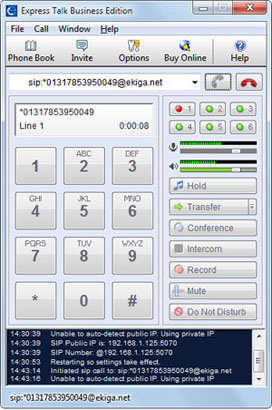
Express Talk works like a computer telephone. Call from PC or Mac to anyone who also has a softphone installed and if you sign up with a VoIP gateway service company you call regular telephone numbers as well.

Express Talk is suitable for use with all of the software in our telephony suite including Axon, a VoIP Virtual PBx System. Combine Express Talk with these other telephone applications to customize a complete phone system to fit your individual home or business needs.

Click here to download Express Talk VoIP Softphone Download Now Purchase Online

Click here to take a closer look at Express Talk VoIP Softphone

More VoIP computer softphone screenshots

Softphone Features
  • Make voice and video calls free between computers
  • Supports PC to phone via a VoIP SIP gateway provider
    More information on VoIP
  • Place callers on hold (on-hold music included)
  • Supports caller ID display and logging
  • Includes a phone book with quick dial configuration
  • Integrates with Microsoft Address Book.
  • Data compression, echo cancellation, noise reduction and comfort noise
  • Supports emergency numbers calling (e.g. 911, 999, 000)
Additional Business Features
  • Configure up to 6 phone lines
  • Call transfer
  • Phone call recording
  • Do Not Disturb
  • Push to talk intercom
  • Call conferencing for up to 6 people

SIP Softphone


Features
Screenshots
System Requirements
Download Now
- for Windows
- for Mac
SIP Service Providers
Developers SDK
Questions (FAQs)
Technical Support
Discussion Forum
Pricing & Purchasing

Related Software


Virtual PBx for Offices
VoiceMail Software
Call Recording Software
Call Conference Server
Answering Machine Software
On-Hold Message Player
More Phone Software...
More Software...

Recommended Hardware


Headsets
Microphones
Webcam

System Requirements
A broadband connection is preferred for both PC and Mac (performance is not guaranteed on a dial-up connection)

Windows Mac OS X
  • Windows XP/2003/Vista/2008
  • For earlier versions please see Windows 98/ME and Windows 2000 respectively for legacy software.
  • A soundcard
  • Mac OS X 10.3
  • Optional headset

Express Talk can be used with USB phones, Headsets, Microphones and a set of speakers, or with either a Webcam or USB video phone for video calls.

SIP Service Providers
With Express Talk you could potentially call someone using their internet IP (eg. "bob@1.2.3.4") but this is not usually practical. It is much easier to use a friendly address like "bob@myphoneco.com". To have this you need to sign up with a SIP proxy service. This is almost always free to signup for and usually requires nothing more than an email address. See our Recommended SIP Service Providers List for a list of options.

Some of the companies also provide gateway services. This means connecting phone calls to ordinary (non internet or analog PSTN) phone lines. These calls tend to be much less expensive particularly for international calls compared to regular long distance charges since they can offer local call rates.

Related Software for Power VoIP Users
Express Talk can be integrated with any of the other applications in the NCH Software Telephony Suite to create a customized business solution, with added functionality.

Softphone Download
 
Useful links

Download Express Talk
Questions (FAQs)
Technical Support
Make a suggestion
Report a bug

Related Software

Virtual PBx for Offices
Conference Call Server
Auto Attendant Software
More Phone Software...
More Software...

Top | Privacy | Legal | Home
© NCH Software