PlayPad Media Player Free music and video player for Windows PlayPad is a high quality and free audio and video player.  Video Player It is a mkv, flv, mp4 and avi player.  Music Player It is a Mp3, flac, amr and mpc player.  DVDs and CDs DVD and CD player for Windows computers.
The simple, yet robust software will have you enjoying your first playlist within minutes of downloading. PlayPad Media Player is a completely free music and movie player. We hope you enjoy it so much, you will try some of our other Video and Audio Software. |  |
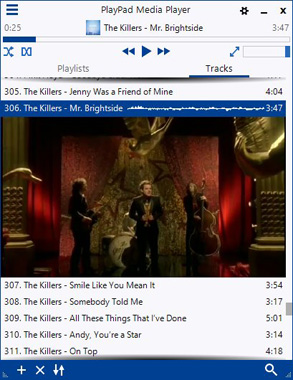 See more Media Player screenshots >>> | Video Player Features - Video including, but not limited to: .mkv, .flv, .mp4, .avi, .swf, .mov, .wmv, .vob and .webm players
- Subtitle files including .srt, .ass and .ssa player
- DVD player supports DVD video playback
Music Player Features - Audio including, but not limited to: .Mp3, .flac, .mpc, .amr, .ogg, .wav, .m4a and .wma players
- This .m3u8, .m3u, .pls, .p3l, .xspf, .jspf and .fpl player imports your existing playlists
- CD player includes audio playback and CD ripper
Media Player Features - Customize the interface with your favorite color combination
- Choose to have PlayPad automatically get album artwork for you
- Create custom media keys if your keyboard doesn’t have them
- Use the graphic equalizer to adjust frequency levels
- Create audio playlists, video playlists or a playlist including audio and video
|
|
PlayPad Media Player System Requirements Download PlayPad Media Player | Related Software  | Take your remixed tracks to Zulu DJ software to mix it up at your next party. |  | Perfect for more advanced audio editing of single audio tracks. |  | Create professional quality videos in minutes. Making a movie has never been easier. |
|