TimeChimes Automatic School Bell System Play sounds at pre-scheduled times TimeChimes is a software application that will play a sound or sounds at pre-scheduled times of day on each day of the week. Typically, TimeChimes can used to play school or church bells or shift-time sounds in factories or businesses. It can also be used for other applications where you want a sound to play at preset times. TimeChimes does not need a dedicated computer. TimeChimes can run in the background on a computer which you can continue to use for other tasks. TimeChimes will run on the Tray of the Task Bar and play automatically even if you are doing something else. |  |
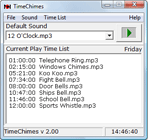
More Screenshots >>> | Features - Plays bells, chimes or any other sounds at preset times
- Schedule times for automatic play on each day of the week (or weeks on a dual week cycle)
- The current day's play times can easily be changed if required
- Includes 9 pre-recorded bell type sounds
- Other sounds can be loaded as wav and mp3 formats
- Automatically runs on startup or as a service
- Easy to use for day to day operation
|
System Requirements - Windows 2000/XP/2003/Vista/2008 & Windows 7
- For earlier Windows versions (98, ME) please click here
- A sound card
Download TimeChimes |
