Home | Download | Purchase | Support | Products | SiteMap  

Vemail Voice Email Software

Record and send voice messages using ordinary email from a PC or Pocket PC

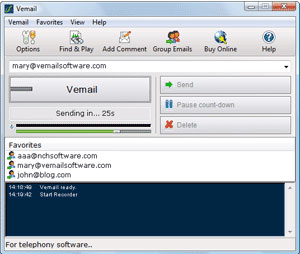
Vemail is voice email software that lets you record and send audio messages instead of text using ordinary email.

To send a voice message with Vemail simply enter an email address and then press and hold down F6 while speaking. When you have finished recording, the message will be compressed and sent as an email automatically. Anyone can receive and listen to the audio email as it can be played with the standard player installed in almost all computers.

Vemails are much faster than typing. They improve electronic communications by letting people speak rather than type. You will also find Vemails more personal because voice is much easier and natural than typed text. The software is very easy to use and in a short time you can be quickly sending Vemails where in the past you would have spent a long time typing.

A full list of Vemail features follows but a quick way to try it out is to download and install now. You don't need to purchase to download and it only takes a couple of minutes to complete the process (click here to install). After you have tested Vemail and found it to be suitable, you can purchase a location license (click here to purchase).

Click here to download Vemail Voice Email System
Purchase Vemail online and save up to 30%
Download Vemail for Windows
For Windows
For Pocket PC
Typical Applications
  • Quick messages in the office. It is faster to vemail someone than to type an email or call.
  • Messages between friends. Audio emails can be much more more personal than text.
  • For people with disabilities who find it difficult to type.
  • Use Vemail on your Pocket PC to get a message out faster.

Click Here for More Screenshots

 
Features
  • Automates the recording of voice attachments to emails so you don't have to type.
  • Compresses the recording with selectable audio compression codec so recordings downloads quickly.
  • If you install a text-to-speech engine it will translate the recording into text as a draft and include it with the email.
  • Edits recordings together if required. For example if you want to continue recording after a short break it will join the segments together.
  • Supports the most popular audio formats - wav, gsm and mp3.
  • Save current and sent recordings and search at a later date or burn directly to CD.
  • Send emails to individuals or groups.
  • Add written comments to be automatically included in the body of the email.
  • System wide hot-keys can be set so you can send vemail by pressing a special key without opening the program.
  • User friendly operation for day-to-day use. No technical knowledge required.

Vemail
Introduction
Features List
System Requirements
Screenshots
Download Now
  - For Windows (exe)
  - For Windows (zip)
  - Pocket PC (installer)
  - Pocket PC (zip)
Pricing & Purchase
Discussion Forum
Questions (FAQs)
Technical Support
 
 
Related Software
Dictation Recorder
Internet Telephone
Sound Editor Software
Voice Recording
Dictation Software
Transcription Software
More Audio Software...
 
 
Recommended Hardware
Multimedia Headsets
Microphones
 
System Requirements - Windows
  • Windows 95/NT4/98/2000/Me/XP/2003/Vista.
  • Sound Support on your PC (Most modern computers have sound).
  • Microphone and Speakers (or a headset). These can be built into the computer.
  • Internet access
System Requirements - PDA
  • A Pocket PC 2003 later or Windows Mobile version 5 or above.
  • Must have an ARM, SH3 or MIPS CPU. (This covers almost all models on the market, and virtually all modern Pocket PCs have an ARM based processor).
  • Built in microphone & speaker (most do).
  • Internet access

Download and Install

To download and install Vemail voice email software, download the following install file. When download is complete open it. The install file will setup Vemail and display the Quick Start Guide.

Related Audio Software
Vemail voice email software is just one part of the NCH Swift Sound Business Audio Software Suite. On the pages below you will find many other software business audio related solutions.

Express Talk PC Based VoIP Softphone
Express Dictate PC Based Dictation Recorder
VRS Voice Logger Software
IVM Telephone Voice Mail and IVR System
Software Index Over 20 other business audio programs

More Information...

For more information see:

Software Development and Customization Services

If you have any suggestions for improvements to Vemail or suggestions for other audio software that you might need, please visit our suggestions page. Many of our software projects have been undertaken after suggestions from users like you.

We also offer custom audio software development services for commercial organisations. Please visit our development page for more information.


  © NCH Swift Sound Top | Home