WavePad Ringtone Maker Software
Making Your Own Ringtones is Easy
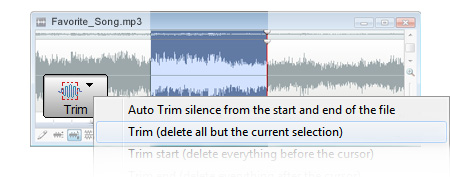
Stand out from the crowd by making your own personal ringtones for your cell phone using the WavePad ringtone creator software. Just import any audio file or rip an audio track directly from a CD into WavePad. You can then cut, copy, mix or even add effects to the audio track to create your own personal sounding ringtone. When done, save the track as either .mp3 or .amr and it is ready to be loaded onto your phone via cable transfer, bluetooth or infared.
Note: Please see your mobile phone manual for a guide to loading ringtones onto your phone.
WavePad is also a full featured professional sound editor for Windows and Mac OS X. It lets you make and edit music, voice and other audio recordings. When editing audio files you can cut, copy and paste parts of recordings and, if required, add effects like echo, amplification and noise reduction.
|
Get It Now
Purchase
|
See more Ringtone Maker screenshots >>>
|
Features
- Save as either mp3 or amr format (to use as ringtones for your cell phone)
- Supports a number of file formats including wav (multiple codecs), mp3, vox, gsm, real audio, au, aif, flac, ogg and many more.
- Sound editing functions include cut, copy, paste, delete, insert, silence, autotrim and more.
- Audio effects include, amplify, normalize, equaliser, envelope, reverb, echo, reverse, sample rate conversion and more.
- Recorder supports autotrim and voice activated recording.
- Includes its own CD ripper with 'ultrafast 'rip mode and cddb music database lookup.
- CD burner function allows you to burn your sound files to CD.
- Works directly with MixPad multi-track audio mixing software.
- Can work with multiple files at the same time in separate screens.
- Supports sample rates from 6000 to 96000Hz, stereo or mono, 8, 16, 24 or 32 bits.
- Tools include spectral analysis (FFT), tone generation and speech synthesis.
- One of the most easy to use ringtone programs.
|
WavePad System Requirements
- Windows 2000/XP/2003/Vista/2008
- For earlier Windows versions (98, ME) please click here
- Mac OS X 10.2 or later; or,
- Pocket PC 2003, Smartphone 2003 (Windows CE 4), Windows Mobile 5 Pocket PC / Smartphone, Windows Mobile 6
- To run under Linux use WINE.
|
Mobile Phone Requirements
To load ringtones onto a mobile phone, your phone must be either 2.5G or 3G compliant and also support the .amr or .mp3 format. For further information please see your mobile phone manual or your phone manufacturer's website.
Typical Editing Applications
- As a music editor for making ringtones.
- Editing mp3 files for your iPod, PSP or other portable device.
- Edit sound files to broadcast over the Internet with BroadWave Streaming Audio Server
- Normalizing the level of audio files before burning to CD.
- Music editing and recording to produce mp3 files to share.
- Voice editing to add to multimedia projects.
Download WavePad Audio Editing Software
More Information...
|