NCH Swift Sound HomeAudio editing software free download. Edit and add effects to Mp3 and Wave audio.
Home | Download | Purchase | Support | Products | SiteMap  

WavePad FFT Software

Powerful Audio Analysis Software

WavePad audio editing software is a full featured professional sound editor for Windows and Mac OS X. It lets you make and edit voice and other audio recordings and also comes with a wide range of powerful audio effects including echo, amplification and noise reduction.

This audio editing software also features two very useful tools for performing sound analysis on the spectral content of audio, the Fast Fourier Transform (FFT) and the Time-Based Fast Fourier Transform (TFFT). These tools have applications in a number of areas, including linguistics, mathematics and sound engineering.

The FFT is designed to illustate the characteristics of audio at only one point in time, whereas the TFFT can take an entire selection of audio and create a graph over that duration.

Advanced Audio Analysis Features
  • Perform a spectral analysis of audio at any one point in time, or across an entire duration.
  • FFT has ability to zoom in on either x-axis or y-axis to see graph in more detail.
  • TFFT has zoom ability as well as a color intensity specifier, allowing you to choose the intensity at which colors are represented in the graph.
  • All graphs are plotted using frequencies up to half the sample rate of the audio and intensities up to 0dB.
  • Freedom to navigate through, or even play your file, and see real-time updates of both graphs. The FFT will update itself instantly, whilst the TFFT graph cursor will update itself to the same point as in the audio file.
  • Works with any audio files that can be loaded into WavePad.
  • Graphs are presented in a simple and intuitive fashion, allowing for optimal viewing and analysis.

Download WavePad audio analysis and FFT software

Download WavePad Purchase Masters

 
Audio Analyzer
Introduction
Advanced Features
About FFT Graphs
About TFFT Graphs
Screenshots
Download/a>
- for Windows
- for Mac (Intel)
- for Mac (PPC)
Questions (FAQs)
Technical Support
Discussion Forum
 
 
Related Software
MixPad Audio Mixer
Express Rip CD Ripper
Express Burn CD Burner
Switch Sound File Converter
Slice Audio Splitter
Stamp ID3 Tag Editor
Tone Generator
BroadWave Audio Streamer
Voice Recording Software
More Audio Software...
 
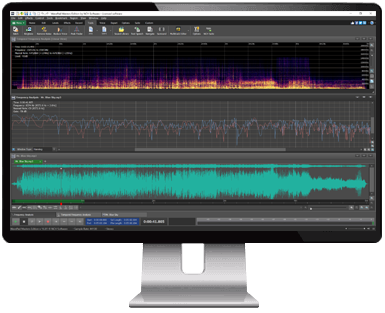
WavePad Main window
WavePad Main Window
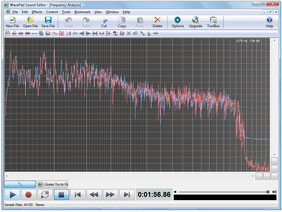
WavePad FFT Graph
Frequency Analysis (FFT)
WavePad TFFT Graph
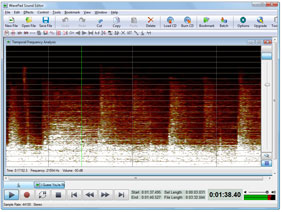
Temporal Frequency Analysis (TFFT)

Click here for more screenshots >>>
FFT Graph
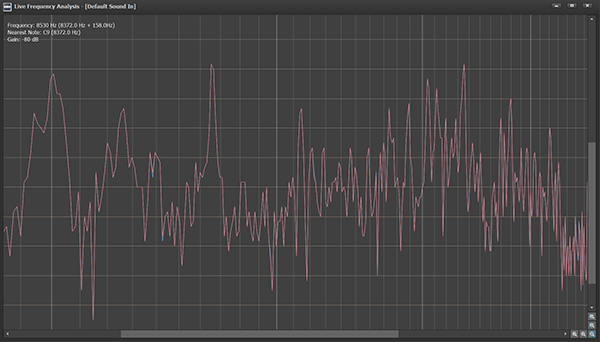
The FFT graph works by taking a small sample of audio and plotting a graph of frequency (x-axis, in Hz) versus intensity (y-axis, in dB). The graph features two different plots if the audio is stereo, otherwise just the one plot will be displayed. The frequency of the graph ranges from 0Hz to half the sample rate of the audio, whilst the intensity range goes from -128dB to 0dB.

TFFT Graph
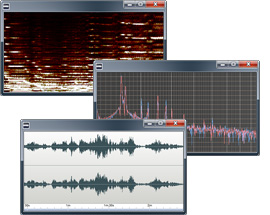
The TFFT graph works by plotting the intensity of the frequency spectrum of the audio across time, and represents intensity through color. The x-axis is used for time (in hh:mm:ss format) and spans the duration of the audio selection. The y-axis is used for frequency (in Hz) and depicts the spectrum of the audio at any one point in time (like the FFT it goes up to half the sample rate of the audio). Then at every point in time and frequency, an intensity calculation is done and a dB figure is calculated (between -128dB and 0dB). This figure is mapped to a color intensity scale and then drawn on the graph, with pure black representing -128dB and pure white representing 0dB.

Other Audio Editing Features
  • Sound editing functions include cut, copy, paste, delete, insert, silence, autotrim and more.
  • Audio effects include, amplify, normalize, equaliser, envelope, reverb, echo, reverse, sample rate conversion and more.
  • Full featured Mp3 editing software support.
  • Supports a number of other file formats including wav (multiple codecs) vox, gsm, real audio, au, aif, flac, ogg and many more.
  • Batch processing supports up to 32000 files allowing you to apply effects and/or convert your files as a single function.
  • Tools include audio restoration, noise reduction and speech synthesis (text-to-speech).
  • Recorder supports autotrim and voice activated recording and more.
  • Supports sample rates from 6000 to 96000Hz, stereo or mono, 8, 16, 24 or 32 bits.
  • Includes its own CD ripper with 'ultrafast 'rip mode and cddb music database lookup.
Download Audio Editing Software
WavePad can be downloaded by clicking here: Once download is complete run the file to install WavePad. When the file has installed, please select Help to view (or print) the complete manual.

More Information...
  © NCH Software Download | Download For Mac | Top | Privacy | Legal | Home