
| |
| Home | Download | Support | Products | SiteMap |
Making your Computer Accessible from the Public InternetA video tutorial series for troubleshooting remote access to server-based applicationsThis is a video tutorial-based resource page for anyone wanting to make their computer accessible to the public Internet.
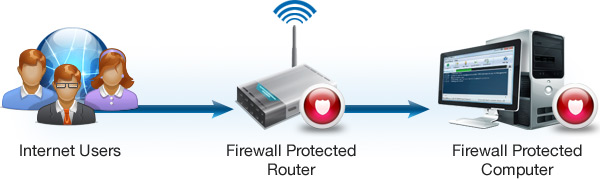 What you need to do to allow connections to your computer:
Make Your Router Forward Connections to the ComputerRouter and NAT configuration by port forwardingFor most people, their NAT router is the biggest stumbling block to getting connections to their server-based application. This tutorial will teach you why that is the case, and what options there are for getting around it, including UPnP and port forwarding. Read the video text here.
Useful Terms: NAT router, UPnP, Port, TCP, UDP, LAN, WAN Additional Resources:
Set Up Your Firewall So It Does Not Block ConnectionsConfiguring your system and third-party firewallsIt is a firewall's job to question any incoming request to your computer. Therefore, it is up to you to tell your firewall which requests are legitimate. This tutorial will remind you where all your firewalls are, and will give basic instructions on how to create exceptions for your application in those firewalls. More detailed firewall resources are listed below. Read the video text here.
Useful Terms: Firewall, TCP, UDP, NAT Router Additional Resources: For Windows OS Firewalls:
Below are links to several personal firewall applications. While it is clearly not a comprehensive list, you can find many resources online by searching the firewall's website and checking their support files or contacting them directly for help creating a rule.
Address and Connect to Your PCHandling static and dynamic IPs, and domain namesDo you know how often your IP address changes? If you don't know the answer, you need to find out. The answer should be never—if you want your server-based application to receive connections. This tutorial explains what a static IP is, and how to get one. Read the video text here.
Useful Terms: IP Address, Port, ISP, DNS System Additional resources:
Some VoIP applications use a method called STUN to keep a line of connection open. This tutorial explains what STUN is, and how much control you have over it. Read the video text here.
Useful Terms: STUN, UDP, NAT Router
Hairpinning Issues with STUN Note that sometimes when testing your IP from within your network you may not be able to connect to it. This just means your router does not 'hairpin' packets. To connect to the server from within your own network you need to use the private IP address (and private port) of that server. From outside the network though (i.e. across the Internet) you can use your public IP address (and public port) to access it.
|
Server-based Software TopicsIP Addresses Router Issues & Port Forwarding Firewall Configuration STUN Glossary of Terms
This page applies to:BroadCam Video Streaming BroadWave Audio Streaming Express Invoice Invoicing Express Accounts Accounting Express Delegate Dictation Manager Axon VoIP Based PBX Express Talk VoIP Softphone FlexiServer Staff Management Inventoria Stock Control IMS On-Hold Message Player IVM Answering Attendant Quorum Audio Conferencing WebDictate Internet Dictation
|
|
Useful links Download Technical Support Make a suggestion Report a bug |
Top | Uninstall | Privacy | Legal & EULA | Contact Us | Home
© NCH Software |