Home | Download | Support | Products | SiteMap  

Pocket Dictate Voice Recorder for Pocket PCs

Dictate With Your Pocket PC

Pocket Dictate is a voice recorder for a palm sized Pocket PC. You dictate directly on your Pocket PC using the buttons on the unit. When done, tap send and the dictation will be compressed, encrypted and sent to your typist by email automatically.
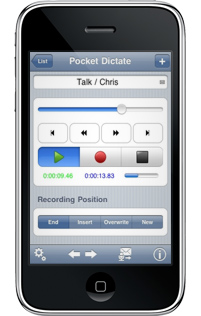
For ease of use, operation of the record and playback features is designed to closely mimic that of old style dictation recorders. For example, you record by holding down the record button on the side of your Pocket PC. Release the button to stop. To continue from where you were press it down again. You can also playback, rewind, insert or overwrite as required using the keys on the front.

This Pocket PC voice recorder is designed to have all the features you need as easy to use as possible and reliable for day-to-day operation. If you install Pocket Dictate you will quickly find it will replace your old dictaphone and, by using the internet to send dictations, will improve the turnaround on typing.

Pocket Dictate is for Pocket PCs but another version is available for Palm OS devices called Palm Dictate. Please see Dictation Recorder for Palm OS for more information.

Free Download of Pocket Dictate Professional Dictation Recorder Software
Download Pocket Dictate Professional Dictation Recorder Software Download Pocket Dictate
For units running Windows Mobile
See also Palm Dictate Professional Dictation Software for Palm PC Also try Palm Dictate
For units running Palm OS

Purchase Pocket Dictate Professional Dictation Recorder Software Buy Pocket Dictate
Full Version for Pocket PCs
Click here to see larger image of Pocket Dictate Professional Dictation Recorder Software

Take a Closer Look >>

 
Features
  • Record and playback dictation using the buttons on the Pocket PC.
  • Editing, inserting and overwriting. You can select between record overwrite, record insert and record end modes.
  • Optional voice activated recording. When selected Pocket Dictate only records while you are speaking.
  • Automatic compression of audio files to reduce upload times and storage requirements.
  • Encryption of recordings prior to transmission to comply with patient or client confidentiality requirements.
  • Sends recording in compressed wave (wav) or dictation (dct) file formats.
  • Sent files can be managed using dictation management software (eg. Express Delegate Dictation File Manager).
  • All files sent by Pocket Dictate can be transcribed by the free foot pedal controlled transcriber software Express Scribe Transcription Player Software.

System Requirements
  • You must have a Pocket PC running 'Pocket PC 2003' or later (Windows CE 4.0 or later). This includes Windows Mobile 5 and Windows Mobile 6 devices.
  • The Pocket PC must have an ARM, SH3 or MIPS CPU. (This covers almost all models on the market, and virtually all modern Pocket PCs have an ARM based processor).
  • The Pocket PC must have a built in microphone & speaker (most do).
  • To send dictations you must setup Pocket Outlook. If your Pocket PC has a wireless connection you will be able to send immediately. Otherwise, dictations will be sent when you 'dock' with ActiveSync.
  • In order to install Pocket Dictate you must have Microsoft ActiveSync installed on the desktop computer you want to install from. (ActiveSync would have been provided on a CD-ROM with your Pocket PC device).
 
Pocket PC Dictation
Introduction
Features
Screenshots
System Requirements
Download Now
- Windows Installer
- Palm OS Version
Pricing & Purchase
Discussion Forum
Questions (FAQs)
Technical Support
 
 
Related Software
Transcription Player
Dictate from PC or Mac
Palm Dictation
Web Dictation
Court Recorder
Telephone Dictation
Typing Expander
Voice Email for PPC
VoIP Softphone for PPC
More Dictation Software...
More Audio Software...
 
Download and Install Pocket Dictate when used from a Windows PC
To download and install Pocket Dictate for Windows, follow these steps:
  1. Download www.nch.com.au/pocket/pdictate.zip. Download should take less than a couple of minutes.
  2. When download is complete, open pdictate.zip and run setup.exe. ActiveSync should run and install the software on your Pocket PC.
  3. Run Pocket Dictate by selecting "Pocket Dictate" from the Start Menu of you Pocket PC.
  4. Read the Pocket Dictate Tutorial by selecting Dictation -> Help -> Pocket Dictate Tutorial.
We also recommend your typist install the foot pedal controlled transcription player software Express Scribe from www.nch.com.au/scribe. Express Scribe is free.

Related Dictation Software
Pocket Dictate is just one part of the NCH Swift Sound Dictation and Transcription Software Suite. On the pages below you will find many other software related solutions to improve dictation and typing turnaround.

Typist or Transcription Services Directory
For the benefit of our software users, we maintain a directory of businesses that can type/transcribe material sent by Pocket Dictate at www.nch.com.au/express/services. If you offer typing services you can be listed (see the site).

More Information...
For more information see:

  © NCH Swift Sound Top | Home