NCH Software Home
Home | Download | Download for Mac | Purchase | Support | Products | SiteMap  

NCH Tone/Waveform Generator

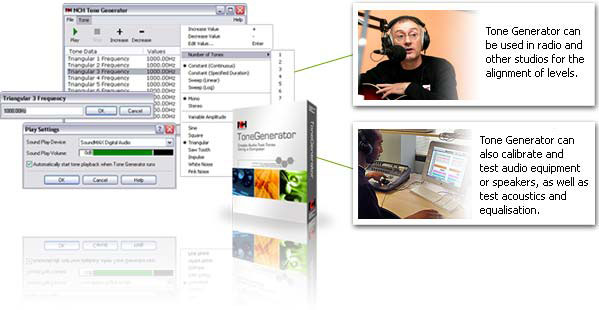
Create tones using a computer with a sound card. It can create selected waveforms including sine, square, triangle, sawtooth, impulse and white noise at selected frequencies between 1 to 20,000Hz. The software could be used as a substitute for the traditional electronic tone generators in Radio Stations or Audio Studios.

Download
Once the file "tnsetup.exe" has downloaded run it. It will the install and setup the tone generator.

More Information
Other Related Software
Software Development
If you have a need for audio software to perform a useful task, please contact us. If we believe that the software would be viable and that we could sell such software to other purchasers, we will develop to software and provide the completed product to you free. For more information please see our Sound Software Development page.
 
Tone Generator
Introduction
Features
System Requirements
Screenshots
Download Now
 - Windows exe
 - Windows zip
 - Mac OS X
 - Pocket PC
 - Palm
Pricing and Purchase
Questions (FAQs)
Technical Support
 
 
Related Software
 
WavePad Sound Editor
Sound Recorder Software
Sound Format Converter
Tone Detector
CD Ripper
Scheduled Recorder
Radio Station Logger
Audio Streamer
More Audio Software...
 
System Requirements
Windows Mac OSx Palm PC Pocket PC
  • Windows 2000/XP/2003/Vista/2008.
  • Sound Card.
  • Mac OS X 10.0 or above.
  • Palm OS5.0 or above.
  • Sound Support.
  • PocketPC (CE version 3.00 or above).
  • ARM, MIPS or SH3 CPU (eg. Compaq iPAQ etc.) **
  • Support for Sound Playback.

** If you want to run this software on another CPU, please let us know. We can provide other versions.
Download Options & Installation
The software can be downloaded by clicking on one of the following links.
Installation Guide
Windows Version: Once download is complete, run the file which will automatically setup the software. The complete manual is included. Once you have run the setup file, select the Help Content item from the menu for a guide to using NCH Tone Generator.
Mac OSX Version: Download the dmg file, double click on it to mount it. Open it and copy ToneGen to your desktop.
PocketPC Version: Save the file to your hard drive. Once downloading is complete, copy the file tonegence.exe use ActiveSync to copy the file into \Windows\Start Menu on 'My PocketPC'.
Palm Version: HotSync Quick Installer should automatically upload and install ToneGen.prc. If required also install MathLib.prc.

Purchase and Registration
NCH Tone Generator is free for demonstration and testing purposes only. If you wish to use NCH Tone Generator on an ongoing basis, you must purchase (register) a license for each installation. To purchase a location license and obtain a registration key by credit card, please click here.

More Information...
For more information see:


   © NCH Software Top | Privacy | Home