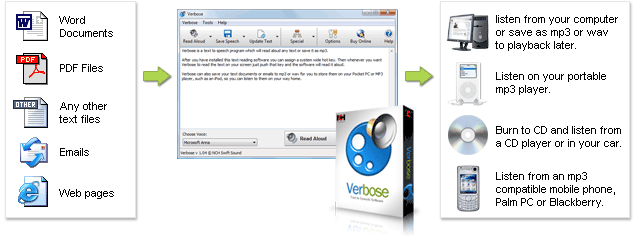
Verbose Text to Speech Software Converts text to voice or saves as mp3 Verbose is an easy and convenient text to speech converter that can read aloud or save spoken text to mp3 files. - Reads any text on your computer out loud
- Convert text to mp3 and save to listen to later
- Installs and ready to read text in just minutes
With Verbose text reading software, you can have Verbose read the current text on your screen out loud with the simple press of a button by setting up system-wide hotkeys. Alternatively, use Verbose text to voice software to save your text documents or emails to mp3 audio files for your mobile phone, iPod or mp3 player, so you can listen to them on the go. After you've saved your spoken text to mp3 or wav, you can add further vocal effects and create a variety of character voices with Voxal Voice Changing Software. | 
|
Screen Reader Applications - Save email text to mp3 to review away from the office
- Relax while your PC reads long documents to you
- Use voice synthesis to create prompts for interactive voice response systems
- Listen to an ebook on your way to work
- Study for exams by listening to your notes
- Proofread by having your writing read back to you
- Convert doc to mp3 to take reading with you on your daily walk or run
- Great for people with low vision, or reading disabilities
- Save audio for computer voice announcement systems
| Text to Speech Features - Reads text using text to speech technology
- Save speech as compressed mp3 files
- Burn mp3s to CD with a direct link to Express Burn CD Burner
- Change voice characteristics setting to change speed, pitch and volume
- Read text from Internet Explorer, Word, Outlook and other text-based programs
- Install new speech engine reading voices
- Set mp3 and wav encoding options
- Customize hotkeys to read text from any program
- Edit wav or mp3 files with WavePad Audio Editor
| System Requirements Download Verbose Text to Speech Converter |
|
|