AudioTime Programmable Audio Recorder and Player Schedule your PC to record or replay audio AudioTime lets you schedule your Windows computer to record or replay audio at certain dates and times or regular times on certain days of week. It can replay a file while the file is being recorded (to delay the recording) and record or replay multiple files at the same time (if you have more than one sound card installed). AudioTime is ideal for radio stations who regularly need to record network programs at fixed times - this software lets you do it automatically. It can also be used for many other applications where you want to automate the recording or replay of audio. Designed to be very easy and intuitive to use Audio Time will allow you to record and replay within minutes. You don't need to purchase to download and it only takes a couple of minutes to complete the process (click here to install). |  Download Now Buy AudioTime Download Now Buy AudioTime |
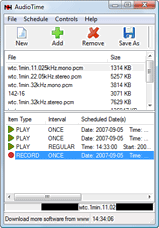
See more screenshots >>> | Features - Record or replay audio automatically.
- Schedule to record or replay once only for a specific date, start time and end time.
- Schedule to record or replay regularly and specify start date, end date, time and days of week.
- Replay a file while it is still being recorded (eg. to delay a network program) or to record a file while it is still being played.
- Select WAV sample rate from 8kHz to 96kHz in either mono or stereo.
- Record multiple files at the same time or replay multiple files at the same time by installing more than one sound card.
- Password protect various actions including Program Settings and Scheduling.
|
|
System Requirements - Windows 2000/XP/2003/Vista/2008 or;
- For earlier Windows versions (98, ME) please click here
Download Audio Time |
