VRS Recording System Professional Multi-Channel Sound Recording Software VRS is a professional multiple input voice recording application for Windows PCs. Typical Voice Recording Applications - Radio station program logging
- Remote audio monitoring
- Control room voice recording
- Specialized voice recording applications
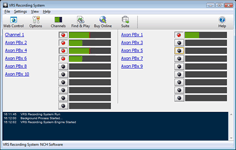
VRS multi channel recording software can record up to 64 audio channels simultaneously with digital signal processing and automatic level controlto improve voice intelligibility. Audio recordings are automatically compressed for archiving and later they can be searched for by date, time, or more. |  Download Now Purchase VRS Download Now Purchase VRS |
Take a Closer look at the VRS
Recording System >>>
| Voice Recorder Features - Record up to 64 audio channels simultaneously
- Automatic, voice activated and continuous recording modes
- Break recordings into easily manageable hour-long files
- Signal processing and level control to improve voice intelligibility
- Advanced audio compression to reduce file size
- Find and play recordings by date, channel, length or keyword search
- Save recordings as wav, mp3 or gsm files
- Log recording details to a SQL database or a csv file
- Mirror recordings to backup drive(s)
- Automatic upload of recordings to FTP server for web or internet access
- Automatically send recordings to an email address
- VRS RemoteMonitor to remotely listen to recording live
- VRS RemoteControl to control recordings from another workstation
- Includes an SDK for third party programs to control recording
- Web access allows you to find and play recording over the internet
- VRS can also be used for telephone call recording
|
|
| Note: VRS is designed to record 1 - 64 independent channels and processes and stores each channel separately. For a recorder that is more suited to recording many microphones in the same room in a combined synchronous form, you should consider using the MSRS Conference Recorder.
| Computer Requirements | - Works on Windows (7 to 11)
- See Win 98, Win 2000 and Win XP/Vista to download software compatible with earlier versions of Windows.
VRS is a 32 bit application, so please make sure your hardware comes with 32 bit drivers. If you have a 64 bit machine, you need to choose to install the 32 bit TAPI files for VRS to work properly. |
| Recording Hardware | Audio for VRS can be from any of the following sound devices: - The standard computer sound in (1 channel only). Just plug the audio source in.
- The standard computer sound in split to 2 mono channels. Buy a simple Y cable from your local electronics store to wire 2 mono sockets to a stereo plug. Then using Channel Properties assign one channel to "left mono" and the other to "right mono".
- Multiple sound cards in one PC. Depending on slots and resources you can install up to 3 sound cards in one PC, and each stereo input can be split for a total of 6 inputs. This requires a more technical work than a multichannel soundcard.
- Multichannel sound cards.
- USB sound devices. USB devices usually can be used with a hub to connect many devices to one PC. Most modern USB sound devices let you do this, but check with the manufacturer before purchasing.
|
|
Download VRS Radio Recording Software |
|

