NCH Software Home
Home | Download | Support | Products | SiteMap

Express Scribe Transcription Playback Software

Digital Transcription Audio Player Software

Express Scribe is free professional audio player software for PC, Mac or Linux designed to assist the transcription of audio recordings.

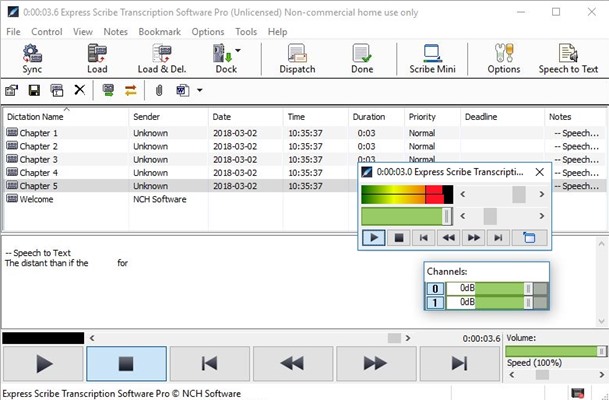
A typist can install it on their computer and control audio playback using a transcription foot pedal or keyboard (with 'hot' keys). This computer transcriber application also offers valuable features for typists including variable speed playback, multi-channel control, playing video, file management, and more.

Express Scribe is completely free and can be used without any restrictions. We make it free because we know you will love it so much you will use and recommend our commercial digital dictation suite to others. Please visit our Dictation Software page.

Download Application Get It Now - Free

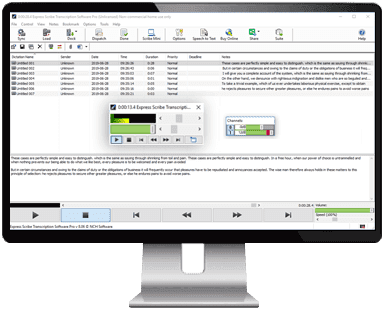
Click here for more Digital Transcription Software Screenshots

See more Digital Transcription Software screenshots >>>

Features

  • Variable speed playback (constant pitch).
  • Supports Video.
  • Supports professional foot pedals which connect to the USB port to control playback. More info...
  • Uses 'hot' keys to control playback when using other software (eg. Word).
  • Ability to dock both analog and digital portable recorders to load recordings.
  • Works with Microsoft Word and all major word-processor applications.
  • Integrates directly with Express Delegate Dictation Workflow.
  • Automatically receives and loads files by internet (FTP), email or over a local computer network.
  • Automatically sends typing to those who dictated the work.
  • Works with speech recognition software such as Dragon Naturally Speaking to automatically convert speech to text.
  • Loads CD audio directly - start to work as it loads in the background.
  • Can switch to 'mini' mode to reduce screen space.
  • Integrate with dictation management systems using the Express Scribe SDK.
  • Works with FastFox typing utility to turn difficult medical/legal phrases and common terms into mere shortcuts from your keyboard.
  • Express Scribe is free.

Transcription Software


Features
System Requirements
Download Now
- for Windows
- for Mac OS X (Intel)
- for Mac OS X (PPC)
Foot Pedal Controls
Introduction Tutorial
Brochure
Developers SDK
Screenshots
Questions (FAQs)
Technical Support
Discussion Forum

Related Software


Dictation Recorder
Pocket PC Dictation
Internet Dictation
Telephone Dictation
Sound Editor Software
Extract Audio from CD
Court Audio Recorder
Word Counter Program
Music Transcription
More Software...

Recommended Hardware


Foot Pedal Controllers
- Buy Pedals
- DIY Pedals
Headsets
Microphones

Professional Foot Pedals

Increase your words per minute by giving your feet control of playback leaving your fingers free to type.

Click here for more information or to purchase a transcription Foot Pedal Transcription foot pedals are suitable for both Windows and Mac OS X.

The pedals are "plug and play" which make them easy to install and use. There are three controls which are usually setup for rewind (right), play/pause (center) and fast-forward (left).

  Purchase a foot pedal
  'DIY' foot pedal solutions

Express Scribe has been designed to work with professional foot pedals to help improve your transcription turn-around and increase productivity.

Click here to download the completely free Express Scribe transcription playback software and Express Scribe Mini

Supported File Formats

Ability to play most audio file formats (including encrypted dictation files) including:

  • dct (encrypted dictation)
  • Windows Media, VoiceIt (sri)
  • RealAudio (ra and rm)
  • Olympus, Lanier & Grundig (dss)
  • Sony Recorder formats (msv, dvf)
  • Philips Digital Recorder format
  • Sanyo Digital Recorder format
  • DSP TrueSpeech*, GSM 6.10,
  • mp2, vox, PCM, uLaw,
  • ALaw, ADPCM, CELP, SBC,
  • ACT, APE, MPC, SHN, SPX.
  • 3GP, AVI, DIVX, FLV, MKV, MOV, MP4, MPEG, WMV
  • and many more formats.
    * will not work on Vista

System Requirements

  • Windows 2000/XP/2003/Vista/2008 and Windows 7
  • Mac OS X - 10.1 or above
  • Linux - see here.
  • For earlier Windows versions (98, ME) please click here
  • Sound Card or Integrated Sound Support.
  • Optional - Foot Pedals - More info...
  • Optional - SAPI Speech Engine (eg. Dragon Naturally Speaking, etc.)
  • Optional - Internet connection for automatic online reception of files.

Download Express Scribe Transcription Playback Software

Related Software

Express Scribe is one part of the NCH Swift Sound dictation and typing suite. Other titles include Express Dictate, a professional dictation recorder for PC's, FastFox, a typing expander to automatically expand words to lines of text, and DialDictate which allows you to record dictations over the telephone. For a more software please see our Dictation Software page.

Useful links

Download Express Scribe
Questions (FAQs)
Technical Support
Make a suggestion
Report a bug

Related Software

Sound Editor Software
Multitrack Software
Audio Converter Software
CD Burner Software
More Software...

Top | Privacy | Legal | Home
© NCH Software