IVM Voicemail Software Complete computer voice mail solution IVM is voicemail software for Windows PC. This program can be used to create an effective standard voice mail solution or a VoIP voicemail server from a single line after hours answering machine to a 64 line corporate system with thousands of voicemail boxes whether you have standard telephone lines or VoIP services or even run them concurrently. Setting up a PC voice mail system is easy. Download the software and install it on any Windows PC. For professional or multiline installations we recommend a telephony board to connect to the phone line(s). For home single line use a voice modem in the PC may be sufficient. VoIP services can be used to receive calls directly via the Internet or from a VoIP PBX without any special hardware to create a sip voicemail system. |  Download Now Purchase IVM Download Now Purchase IVM |
A list of features follows but a quick way to see how IVM computer voicemail software works is to download and install now. You don't need to purchase to download and it only takes a couple of minutes to complete the installation process. Once you have tested IVM and found it to be suitable, you can purchase purchase IVM here. 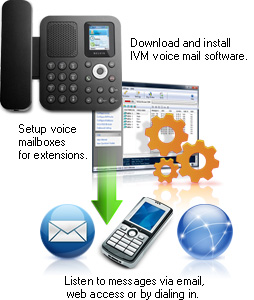 Click Here To See More IVM Screenshots >>> | Voicemail Software Features - Multiple telephone line support (1 - 64 lines simultaneously)
- Supports unlimited voice mail boxes
- Visual display for menu setup with drag and drop functionality
- Supports concurrent PSTN and VoIP telephone lines
- Free professionally voiced greetings included
- Text-to-speech voice synthesis as an alternative to recording or importing wav or mp3 files
- Ability to forward messages by email or upload to Internet
- Remote access messages over the network or Internet using your web browser
- Listen to messages by dialing in
- Save messages as wav or mp3 files
- Unlimited out-going messages and menus (ability for callers to key press or voice responses for options or data entry)
- Fully programmable setup with examples and plugins available for typical applications
- Call transfer (subject to your phone company or PBX features)
- Call simulator is included so you can test your systems off-line
- Auto-hours feature can turn the voicemail system on or off automatically at different times of day
- Highly configurable and flexible PC based voice mail system
|
System Requirements - Windows 2000/XP/2003/Vista/2008 and Windows 7
- To link to phone lines one of the following:
- To link through a PBX or telephone system the PBX must either be:
- Able to link to external analog port / socket; or,
- A SIP compliant VoIP PBX (try Axon Virtual PBX if you don't have one).
If you intend to use the IVM with a voice modem, please note that there are many voice modems on the market with defective TAPI wave / voice drivers. If you have difficulties with your modem, please see the Trouble-Shooting page of the IVM Help Pages for some solutions to modem driver problems. |
Download IVM Voice Mail Software Purchase IVM Software Example Setup IVR Files A number of example IVR files are included with IVM which can be useful as a starting point when creating your own system. They will give you an example of a basic setup for the particular task. You will still need to take the time to read IVM's manual to be able to modify the IVR Program for your specific requirements. |
