Axon Virtual Home PBX SoftwareWindows Home PBX Phone Management SystemWith this cost effective software you can bring state-of-the-art VoIP technology into your home and benefit from all the call management featured that used to be reserved for businesses. - Easy to use Windows based home PBX software
- Reduce your phone bills with VoIP
- Give everyone in your family their own extension
- Install and start making calls in minutes
Axon is a virtual PBX system designed to help manage phone calls for large families under one roof or even help families that are all spread out stay in touch. Set up a pbx at home and give an extension to every family member for easy direct dialing.
|  Download NowPurchase Axon Download NowPurchase Axon |
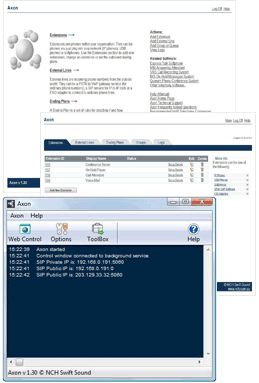 | | Home PBX System Features - Manage a home telephone system for all family members
- Standard PBX features like call transfer, hold, and record
- Easy web-like control panel
- Up to 64 extensions or external lines*
- Voicemail for each extension
- Basic On-hold Music
- Digital call routing over a computer network (including wireless)
- Can be used with VoIP and/or traditional landline phones
- Supports video for Express Talk Softphone or USB/IP Video Phones
* License dependent, click here for more information on the different licenses. Easy to UseWe have designed this home PBX software to be very easy and intuitive. Within minutes you can start making phone calls. The best way to see what this virtual pbx software can do is to give it a try, download now and take advantage of the free 14-day trial.
|
|
System RequirementsExtension Device Requirements - SIP Standard VoIP (RFC 2543 or RFC 3261)
- Symmetric UDP signalling with reINVITEs
- Individual extensions can use any of the following:
| | Computer or Server - Windows XP/2003/Vista/2008 and Windows 7
- For earlier versions please see Windows 98/ME and Windows 2000 respectively for legacy software.
- Computer network (any IP network)
- Broadband Internet Connection (for external VoIP lines)
| | For testing, before you buy VoIP phones, we recommend you use our Express Talk Softphone. |
External Line RequirementsVoIP Lines - SIP Standard VoIP (RFC 2543 or RFC 3261)
- SIP proxy server, username and password
- For Video: SIP provider must support H263, H261
| | Traditional Analog Telephone Lines
Any one of the following for connecting analog lines: | We recommend considering VoIP telephone numbers because they offer better quality, VoIP providers can provide cheaper home phone bills and VoIP doesn't require additional hardware since calls are routed over the internet. See a list of recommended SIP providers. |
Download Axon Virtual PBX Software |
