TRx Phone Recorder Computer Phone Call Recording Software If you already have a telephone adapter and just want to record and edit recordings on one PC, we recommend WavePad Audio Editor. See this blog item for more info. TRx is a phone call recording program for Windows and Mac OS X. With TRx phone recording software you can manually record telephone calls, view caller ID information and put callers on-hold with on-hold music.
Is this the right call recording software? TRx was designed for business call centers where TRx is installed at each workstation and connected to each telephone using a Handset Call Recording Connector, voice modem or professional telephony board. It can also be used in other business environments or at home to manually record one line. For automatic recording, or to record more than 1 telephone line on the same computer at a time see VRS Multiline Call Recorder. See call recording software for an overview of all our call recording options. |  |
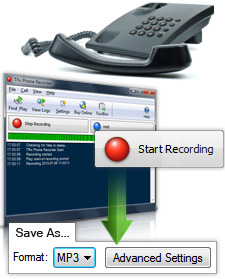 Phone Recorder Screenshots >>> | Phone Recorder Features - Records telephone calls using a voice modem, telephony card or a call recording adapter
- Save recordings as wave or mp3 files or send recordings by email
- Start and stop recording with system-wide 'hot' keys
- Find and Play recordings by duration, name and date
- Speech Search recordings by keyword (requires speech engine)
- Allows you to put calls on hold (professional music and messages
on-hold included) - Integrates with Express Burn to archive audio recordings to CD
- Edit recordings with a linked WavePad Audio editor
- Suitable for recording mobile cellular calls. See Call Recording Adapters for hardware information
- Automatic mirror recordings to an alternate network/folder for backup
- Regulates recording volumes levels automatically
- Display and log the caller ID details of incoming calls*
- Play Recording started and stopped announcements and tones during recording*
* optional and subject to hardware and telephone network features |
|
System Requirements Windows
Telephone Recording | Note: Turn off your modem's "wait-for-dial-tone" setting to use with TRx (see the Help for more information)
| Mac OS X
Telephone Recording | Note: The Mac phone recorder only works with a connector, not with voice modems
|
Download TRx Phone Recorder Call Recording Scenarios TRx supports a number of different hardware setups. For a step by step guide to setting up your system to record phone calls, please see this Call Recording Scenarios page. |

